Creating a cozy and productive home office space is essential for anyone working from home or pursuing personal projects. A well-designed workspace can improve focus, reduce stress, and make your workday more enjoyable. Whether you have a dedicated room or a small corner, the right setup can transform your daily routine. Here are some tips to help you craft the ideal home office environment.
1. Choose the Right Location
Finding the best spot for your office is the first step toward productivity and comfort.
– Natural Light: Select a space near a window if possible. Natural light boosts mood and alertness.
– Quiet Area: Opt for a place with minimal distractions, away from loud noises or high-traffic areas.
– Space to Move: Make sure you have enough room to stretch and organize your materials comfortably.
2. Invest in Comfortable Seating
Your chair is key to staying comfortable during long hours of work.
– Ergonomic Design: Pick an ergonomic chair that supports your back and encourages good posture.
– Adjustability: Adjustable height and tilt options ensure the chair fits your body and desk perfectly.
– Cushioning: A well-padded seat helps prevent discomfort and fatigue.
3. Optimize Your Desk Setup
A clean and practical desk layout can enhance efficiency.
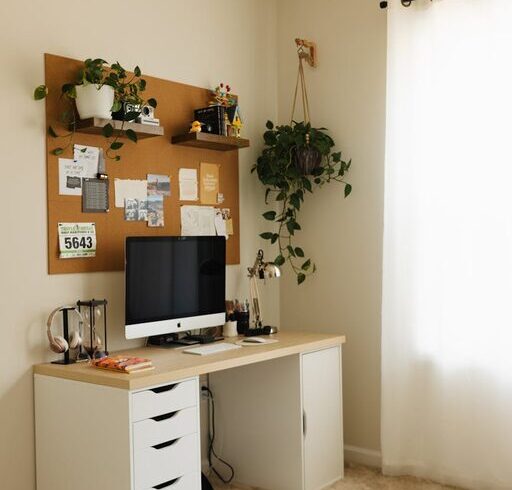
– Desk Size: Choose a desk that fits your needs and the available space—adequate surface area for computer equipment, notes, and other essentials.
– Declutter: Keep only necessary items on the desktop to reduce distractions.
– Cable Management: Use clips or covers to keep cords tidy and out of sight.
4. Personalize Your Space
Adding personal touches can make your workspace inviting and inspiring.
– Decor: Incorporate art, plants, or photos that motivate and comfort you.
– Colors: Use calming or energizing colors depending on what helps your focus best.
– Lighting: Include a mix of natural and task lighting like adjustable desk lamps to reduce eye strain.
5. Organize Efficiently
Staying organized supports productivity and mindfulness.
– Storage Solutions: Use shelves, drawers, or filing cabinets to keep documents and supplies organized.
– Daily Essentials: Keep frequently used items within easy reach.
– Digital Organization: Maintain a clean desktop and use software tools to manage tasks.
6. Create Boundaries Between Work and Home Life
Setting clear limits helps you stay focused and relax when work is done.
– Defined Work Hours: Establish a routine to start and end your workday.
– Physical Separation: Close the door or use a room divider to mentally separate work from leisure.
– Break Areas: Designate nearby spaces where you can take short breaks away from your desk.
7. Incorporate Comfort and Well-Being
A comfortable workspace supports both health and productivity.
– Temperature Control: Ensure the space is neither too hot nor too cold.
– Air Quality: Open windows when possible or use air purifiers to maintain fresh air.
– Movement: Take regular breaks to stretch or walk, and consider a standing desk if that suits your style.
8. Use Technology Wisely
Technology is essential but should enhance, not hinder, your workflow.
– Reliable Equipment: Invest in a good computer, a fast internet connection, and quality peripherals like keyboards and mice.
– Noise Control: Noise-canceling headphones can help maintain focus in noisy environments.
– Backup Systems: Use cloud storage or external drives to protect your files.
Final Thoughts
Designing a cozy and productive home office is about balancing comfort with functionality. By carefully selecting your location, furniture, and organization systems—and personalizing your space—you can create an environment that keeps you motivated and efficient. Remember, the best office is one that feels good to you and supports the way you work. Start small, make adjustments, and enjoy your new workspace!